
Social Media Strategy
Build Trust. Communicate Directly.
Why Should Your Business have a Social Media Presence?
- Marketing experts agree that having a presence on social media is essential in today’s competitive business world.
- Consistently posting and interacting on these sites is imperative to developing business through social media.
- Maintaining a powerful social media presence for your business allows you to communicate with your existing customers while gaining new ones.
This will allow you to focus your time and energy on what you do best – running your business.
Why Choose Digital Media Butterfly to Manage my Business’ Social Media Presence?
- From creating content and images to ensuring that your branding is consistent across all your social media platforms, my goal is for your businesses social media to be something you are proud of and that others take note of.
- Working together, I will create a complete social media marketing plan designed to get the best results for your business.
- I have been helping clients with their social media presence since 2008, growing my skill-set and adapting to the new social media platforms and challenges.
- We can work together to keep you front of mind with your prospective clients and referral sources.
No Results Found
The page you requested could not be found. Try refining your search, or use the navigation above to locate the post.

Social Media Trends
The world of Social Media is a fast-moving, constantly changing world. Trying to stay on top of everything can feel like moving the wrong way on an escalator. Part of my job as a social media strategist is to sort thru all the streams of information and help my...
What is Digital Marketing?
Digital Marketing is one of those new buzz words that keeps getting passed around, so I thought I would take a minute and share with you what it actually is. Digital Marketing is the movement beyond print media to use on-line media channels to market a brand, product,...
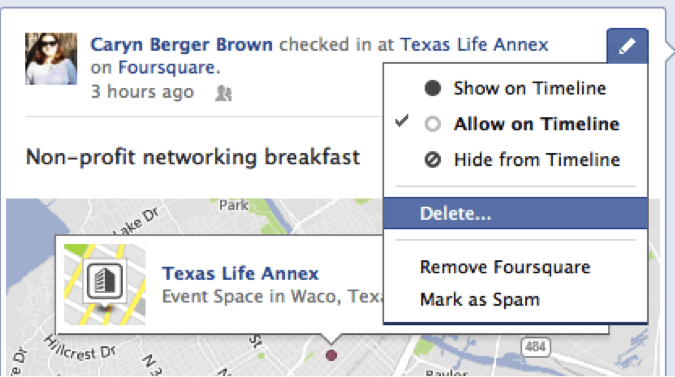
Deleting A Facebook Post
Log into Facebook. Click on your name in the upper-right hand corner (if the post you want to delete is on your wall or click on the page from the list on the left-hand side if the post you want to delete is one you made on a page you administer). Hover your mouse...
